Stays record by Segment
Report parameters
|
Field |
Description |
|---|---|
|
Report Name |
The name of the report. |
|
Start Date |
The start date from when the data must be considered for generating the report. |
|
End Date |
The end date until when the data must be considered for generating the report. |
|
Report Options |
Available options include the following:
|
|
Segment 1/2 |
Based on the selected report option, the corresponding segments are displayed as options in the drop-down list. Users can select multiple or all the available segment types from the list to be displayed in the report generated. |
Sample Report
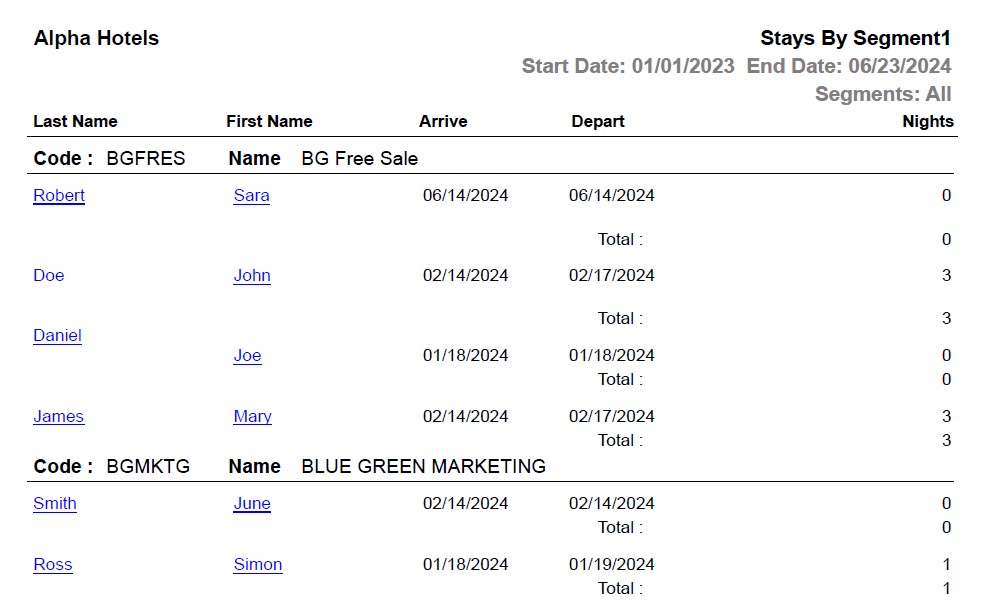
Report Fields
|
Field |
Description |
|---|---|
|
Last name |
The last name of the guest will appear as a hyperlink and clicking it will navigate the user to the guest record. |
|
First name |
The first name of the guest will appear as a hyperlink and clicking it will navigate the user to the guest record. |
|
Arrive |
The arrival date of the guest. |
|
Depart |
The departure date of the guest. |
|
Nights |
The number of nights of stay booked as part of the reservation |
|
Total |
The sum of number of nights of stay of all guests. |